What Are Chassis Ears and How They Can Help Diagnose Your Car Problems
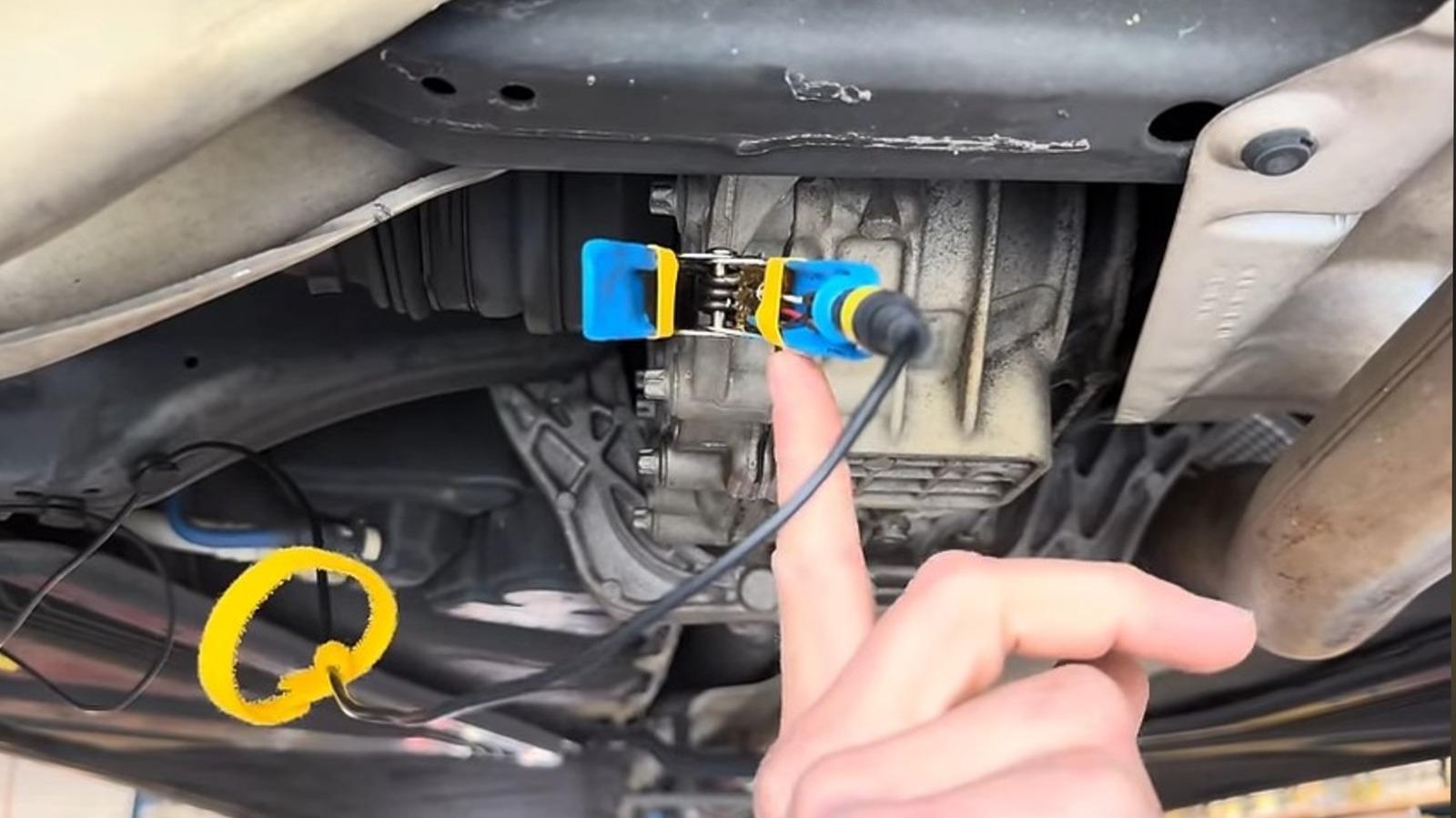
What Are Chassis Ears and How They Can Help Diagnose Your Car Problems
Image: What Are Chassis Ears and How They Can Help Diagnose Your Car Problems – Performance Comparison and Specifications
- Advertisement -
Ever heard a faint squeal coming from your turbo‑petrol engine and thought, “What on earth is that?” You’re not alone. Many drivers experience mysterious noises that standard OBD‑II scanners can’t catch. That’s where chassis ears step in – tiny microphones that listen to the heartbeats of your vehicle and turn noise into useful data.
In this guide we’ll break down what chassis ears are, why they’re becoming a staple in modern diagnostics, and how they can help you troubleshoot everything from a rattling exhaust to a failing ADAS sensor. For more technical depth, check out this comprehensive article.
- Advertisement -
What Is a Chassis Ear?
Definition and Basic Concept
A chassis ear is essentially a high‑fidelity microphone that you mount on or near the vehicle’s chassis, suspension, or drivetrain components. Unlike the built‑in sensors most cars come with, these microphones are external, portable, and purpose‑built for acoustic diagnostics. They capture vibrations and sounds that are otherwise invisible to the driver’s ears and the car’s factory diagnostics.
Why Traditional Diagnostics Fall Short
Most modern cars, especially those equipped with ADAS (Advanced Driver Assistance Systems), rely heavily on electronic signals. While a scan tool can read error codes, it can’t tell you why a turbo‑charged engine is whining at 5,200 rpm or why a hybrid’s electric motor makes a high‑pitched squeak during regenerative braking. Acoustic clues often precede a fault code, giving you a head start on repairs.
How Chassis Ears Work
Microphones, Placement, and Recording
Typical chassis ear kits include:
- Advertisement -
- Two or three omnidirectional microphones (one for the front, one for the rear, and sometimes a third for the engine bay).
- A rugged, weather‑sealed recorder that plugs into a laptop or tablet via USB.
- Clip‑on or magnetic mounts that let you position the sensors without drilling.
When the car is running, the microphones pick up sound pressure levels in decibels (dB) across a wide frequency range. The recorder logs the waveform, which you can later analyze with software like Audacity or the dedicated Chassis Ear Pro app. By comparing the acoustic signature of a healthy vehicle with the recorded data, you can pinpoint abnormal vibrations.
Key Benefits for DIYers and Professionals
Whether you’re a hobbyist who loves tinkering with a 2018 Subaru WRX or a shop technician diagnosing a fleet of 2022 Tesla Model Ys, chassis ears give you:
- Early detection of wear on bearings, CV joints, and timing chains.
- Non‑intrusive testing – no need to disconnect sensors or remove components.
- Objective evidence that can be shared with customers or warranty departments.
- Cost‑effective troubleshooting – a $200 kit can save hundreds in labor.
Choosing the Right Chassis Ear System
Design & Dimensions
| Model | Microphone Size | Weight | Mounting Options |
|---|---|---|---|
| EarPro X1 | 12 mm Ø | 45 g | Magnetic, Clip‑on |
| SoundScout 3000 | 15 mm Ø | 60 g | Adhesive, Screw‑in |
| VibeDetect | 10 mm Ø | 38 g | Snap‑fit, Velcro |
Feature Comparison
| Model | Frequency Range | Noise Cancellation | App Integration |
|---|---|---|---|
| EarPro X1 | 20 Hz – 20 kHz | Active DSP | iOS & Android |
| SoundScout 3000 | 10 Hz – 22 kHz | Passive + AI | Desktop only |
| VibeDetect | 30 Hz – 18 kHz | None | Web‑based viewer |
Engine Compatibility and Performance Specs
Engine Specifications
| Model | Supported Engine Types | Max RPM | Voltage Requirement |
|---|---|---|---|
| EarPro X1 | Turbo‑petrol, V8, Diesel | 7,500 rpm | 5 V USB‑C |
| SoundScout 3000 | Hybrid, EV, Inline‑4 | 8,000 rpm | 5 V USB‑A |
| VibeDetect | Any gasoline engine | 6,500 rpm | 5 V USB‑C |
Pricing Landscape
Price Comparison
| Model | Approx. Price (USD) | Warranty | Where to Buy |
|---|---|---|---|
| EarPro X1 | $199 | 2 years | Amazon, Official Site |
| SoundScout 3000 | $279 | 1 year | eBay, AutoZone |
| VibeDetect | $149 | 18 months | AliExpress, Direct |
Installation Tips and a Real‑World Example
Here’s a quick step‑by‑step that worked for my 2020 Ford Focus ST:
- Advertisement -
- Start the car and let it idle for a minute – this stabilizes background noise.
- Attach one microphone to the lower control arm using the magnetic mount; the second goes under the exhaust manifold.
- Connect the recorder to a laptop, launch the Chassis Ear Pro app, and hit “Record”.
- Accelerate gently to 3,000 rpm while listening. You’ll notice a faint “tick‑tick” that spikes at 2,800 rpm – a classic sign of a worn CV joint.
- Compare the waveform to the app’s library. The match confirms the joint needs replacement before it fails completely.
Because the data is visual, you can show a customer the exact moment the noise appears, making the repair recommendation far more persuasive.
Frequently Asked Questions
- 1. Do chassis ears work on electric vehicles?
- Yes. While EVs are quieter, they still produce acoustic signatures from inverters, cooling fans, and regenerative‑brake motors. The SoundScout 3000 even includes a mode optimized for EV frequencies.
- 2. Can I use a chassis ear with a smartphone?
- Most modern kits provide a USB‑C connection that works with Android and iOS tablets. Some models, like the EarPro X1, have dedicated mobile apps.
- 3. Will the microphones survive a wash?
- All three models listed are rated IP67, meaning they’re dust‑tight and can handle immersion up to 1 m for 30 minutes – perfect for rainy test drives.
- 4. Is special training required?
- No. The software guides you through placement, recording, and basic interpretation. However, a basic understanding of vehicle acoustics speeds up the process.
- 5. How do chassis ears differ from OBD‑II scanners?
- Scanners read electronic data; chassis ears capture sound. They complement each other – the ear tells you *what* is happening, the scanner tells you *why* the ECU thinks it’s happening.
- 6. Can I diagnose ADAS sensor issues?
- Indirectly. A loose mounting bracket can cause a whine that interferes with lidar or radar operation. By detecting the mechanical source, you can resolve the ADAS fault.
- 7. What is the typical frequency range for a failing timing belt?
- Usually between 400 Hz and 800 Hz, sounding like a high‑pitched squeal that rises with engine speed.
- 8. Do I need a separate power source?
- No. The recorder draws power from the USB port of your laptop or tablet, making field work hassle‑free.
- 9. Are there any legal restrictions on recording car sounds?
- Generally no, as you’re recording your own vehicle. However, be mindful of privacy when recording in public spaces.
- 10. How often should I run a chassis ear check?
- It’s wise to record during routine maintenance – every 10,000 km or before a long road trip – to catch early wear.
By adding a simple set of microphones to your diagnostic toolbox, you gain a new sense that many modern cars have lost. Whether you’re chasing a mysterious rattle in a turbo‑petrol hatchback or fine‑tuning the quietness of a hybrid sedan, chassis ears can turn “I hear something” into a concrete, fixable problem.
Ready to give your ears an upgrade? Explore the models above, pick the one that fits your budget, and start listening to the language your car is trying to speak.
- Advertisement -